

How deals are created
Yuzu tries to resolve the buyer account when a transcript arrives. The safest signals are provider account IDs, CRM IDs, meeting metadata, and email or domain data from notetakers and integrations. When a transcript includes a buyer email, Yuzu can also create the primary contact for the deal. The goal is to avoid making the seller paste the same buyer name, email, and LinkedIn context again after the meeting has already supplied it. When the source does not provide enough reliable metadata, the call stays visible as an unassigned call. It is not deleted or hidden. You can assign it later. Historical imports are more conservative. Older transcripts are kept searchable and assignable, but Yuzu does not automatically create a fresh deal for every old meeting outside the recent-meeting window. Unassigned calls still open inside Deals. Yuzu creates a temporary call page for the transcript so list view and pipeline view behave the same way. After assignment or merge, the call becomes part of the destination deal thread.What a deal contains
- Calls and transcripts
- TLDR videos
- Public Yuzu Links
- Email threads, replies, draft suggestions, opens, and clicks
- LinkedIn post drafts, published posts, reactions, and comments
- Quotes, objections, next steps, and other insights
- Full-call search moments
- Zu-generated next actions and completed actions
- Manual notes, uploaded files, and pasted transcripts
Merge and assignment
Merging deals does not delete source records. It only changes the grouping so the deal thread, search, insights, and future recap context use the combined history. Use merge when:- A notetaker could not identify the customer.
- Two customer names normalize differently.
- A buyer changed domains or showed up through a different source.
- A manual upload belongs to an existing deal.
Pipeline fields
Deals can carry pipeline stage and status so the list can be filtered by in-flight, stalled, closed-won, and lost work. These fields are lightweight Yuzu fields, not a full CRM replacement. Deals can also carry a deal type, such as customer opportunity, internal, investor, partner, or hiring. Use the All types filter on the list or pipeline view to narrow the workspace. The List/Pipeline switch preserves the active filters in the URL so the view can be refreshed or shared without losing context.VC and investor calls
Yuzu classifies fundraising, investor diligence, board updates, and capital-raising conversations as investor work instead of normal buyer deals. Those records can still be useful, but they should not rewrite buyer-facing GTM strategy, pricing, objections, TLDRs, or business-case pages unless the same fact is also supported by buyer or customer evidence. Use the VC / investors type filter when you need to review that activity without mixing it into the sales pipeline.Signal and next actions
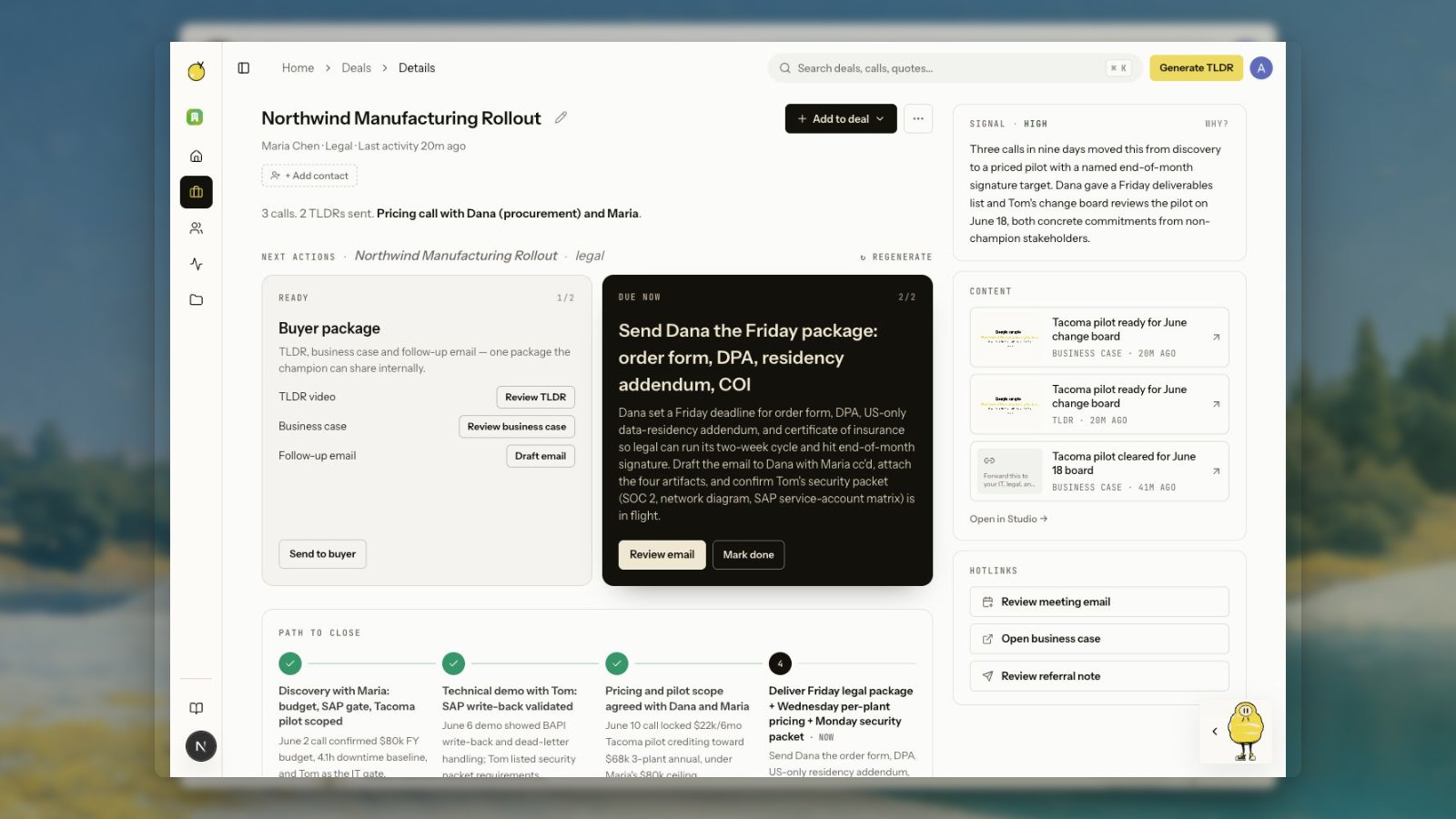
The deal agent reads the deal thread and writes a signal level, signal reason, next actions, and prior completed actions. When a deal has buyer-package work, the package is grouped into one card with one row per artifact:- TLDR recap: the short recap video the buyer can replay or forward.
- Business-case page: the buyer-facing page that packages the recap, summary, CTA, transcript, and product assets.
- Follow-up email: the short seller-reviewed send that shares the package with the buyer.
- LinkedIn post: shown only when the deal has a relevant post or post draft.
Summary and path to close
When the deal agent has enough evidence, the deal header includes a one-line summary. The most important phrase is emphasized so sellers can skim the current reason the deal matters. The path-to-close timeline turns the deal plan into ordered steps. Completed steps show as done, one current step is markednow, and future steps remain upcoming. This makes older meeting history easier to understand without reading every transcript.