> ## Documentation Index
> Fetch the complete documentation index at: https://docs.yuzulabs.io/llms.txt
> Use this file to discover all available pages before exploring further.
# Videos
> Create, review, approve, share, and archive Yuzu videos.
Videos is where generated TLDRs move from draft to shareable asset.
 ## Video states
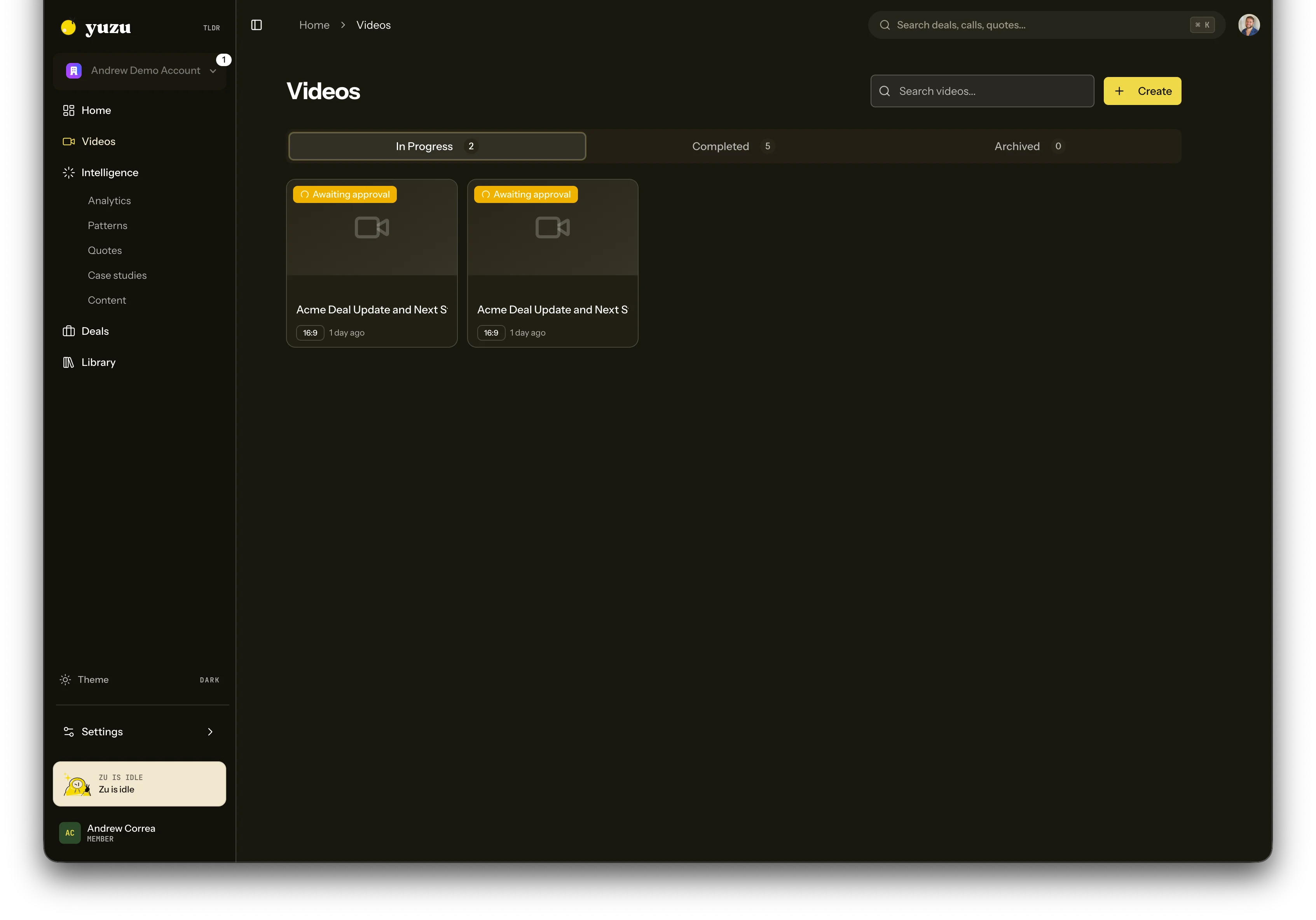
* **In progress** means the video is still being generated or is waiting for approval.
* **Completed** means the video has a rendered asset and can be shared.
* **Archived** keeps old or abandoned work out of the active queue without deleting history.
Completed and archived lists are separated. Archiving a stale approval flow hides it from the completed tab while preserving its history.
## Creating a video
Start from **Create**, **Quick video**, or a transcript. A sales recap can use one call, a pasted transcript, or a connected notetaker source.
Yuzu can now generate recap videos for more meeting types than pure sales calls. Autopilot still respects your workspace settings before creating drafts automatically.
Home can also create a master TLDR for your business page. That overview video is generated from product context and one real call transcript, then attached to a shareable business page.
## Review and approval
Some workspaces auto-approve. Others stop at a review step so you can edit the script before render. If approval is required, the video remains in **Awaiting approval** until someone approves it.
## Sharing and public pages
Completed videos can be shared as Yuzu Links. Public pages can include the video, source context, moments or chapters, CTA links, and a lightweight business case.
For deal work, the TLDR is one row in the buyer package. Generate or review it from the deal page when the video belongs to a buyer thread, then use the business-case page or follow-up email to share the full package.
Non-sales-call videos can also have public pages with moments, so useful call sections remain easy to reference even when the meeting is not a sales recap.
When a video belongs to a deal, the video page links back to the deal thread. Use the deal page for customer context and the public Yuzu Link for sharing externally.
## Thumbnails and brand
Video thumbnails, logo treatment, brand colors, presenter avatar, and voice selection come from your workspace brand and voice settings. You can also use cloned voices across supported video types.
The presenter avatar is optional. If it is enabled and ready, Yuzu can place a talking version of you into supported recap videos. If it is disabled or not ready, videos can render as voice-over slide videos.
See [Presenter avatar](/product/avatar) for the photo-based avatar setup.
## Video states
* **In progress** means the video is still being generated or is waiting for approval.
* **Completed** means the video has a rendered asset and can be shared.
* **Archived** keeps old or abandoned work out of the active queue without deleting history.
Completed and archived lists are separated. Archiving a stale approval flow hides it from the completed tab while preserving its history.
## Creating a video
Start from **Create**, **Quick video**, or a transcript. A sales recap can use one call, a pasted transcript, or a connected notetaker source.
Yuzu can now generate recap videos for more meeting types than pure sales calls. Autopilot still respects your workspace settings before creating drafts automatically.
Home can also create a master TLDR for your business page. That overview video is generated from product context and one real call transcript, then attached to a shareable business page.
## Review and approval
Some workspaces auto-approve. Others stop at a review step so you can edit the script before render. If approval is required, the video remains in **Awaiting approval** until someone approves it.
## Sharing and public pages
Completed videos can be shared as Yuzu Links. Public pages can include the video, source context, moments or chapters, CTA links, and a lightweight business case.
For deal work, the TLDR is one row in the buyer package. Generate or review it from the deal page when the video belongs to a buyer thread, then use the business-case page or follow-up email to share the full package.
Non-sales-call videos can also have public pages with moments, so useful call sections remain easy to reference even when the meeting is not a sales recap.
When a video belongs to a deal, the video page links back to the deal thread. Use the deal page for customer context and the public Yuzu Link for sharing externally.
## Thumbnails and brand
Video thumbnails, logo treatment, brand colors, presenter avatar, and voice selection come from your workspace brand and voice settings. You can also use cloned voices across supported video types.
The presenter avatar is optional. If it is enabled and ready, Yuzu can place a talking version of you into supported recap videos. If it is disabled or not ready, videos can render as voice-over slide videos.
See [Presenter avatar](/product/avatar) for the photo-based avatar setup.