> ## Documentation Index
> Fetch the complete documentation index at: https://docs.yuzulabs.io/llms.txt
> Use this file to discover all available pages before exploring further.
# Home
> The GTM signal view for the week: work waiting on you, call activity, quotes, patterns, and autopilot status.
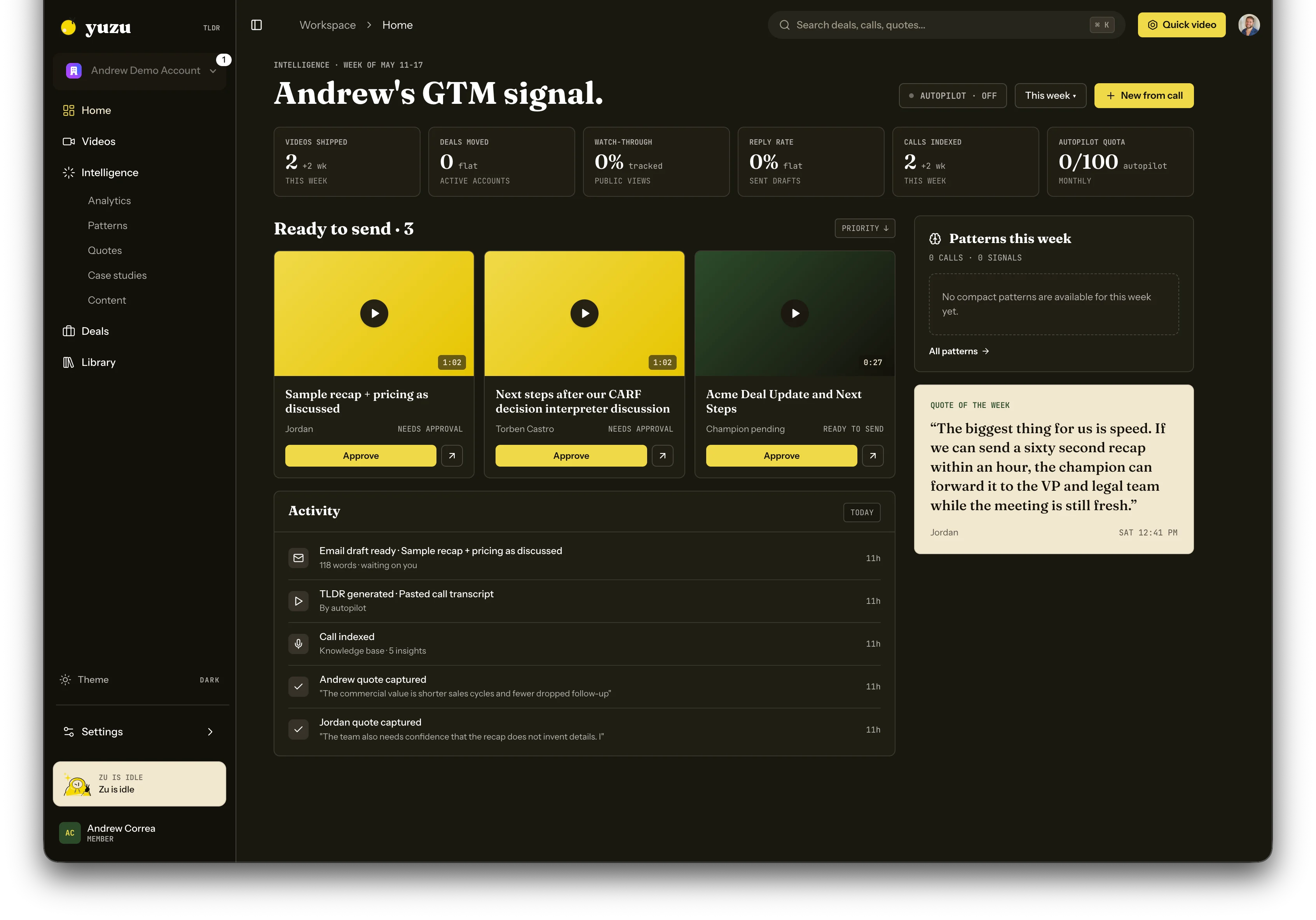
Home is the daily operating view for Yuzu. It shows what needs action now, what changed recently, and whether enough call data exists to turn the week into useful GTM signal.
 ## What you see
* **Needs me** shows deals and setup tasks waiting for human action.
* **All deals** shows the broader active deal list.
* **Stalled** isolates deals that need attention.
* **GTM signal** shows weekly activity, indexed calls, and the state of autopilot.
* **Patterns this week** summarizes repeated signals once enough calls are indexed.
* **Quote of the week** highlights a recent customer quote from the current week.
* **Activity** lists important background work, such as generated TLDRs, indexed calls, captured quotes, and email drafts.
* **Your business page** prompts you to create or publish a master overview page when one is not live yet.
## Quick video
Use **Quick video** or **New from call** to paste a transcript, upload a call, or start a sales recap from a connected meeting source.
## Your business page
The business-page card creates a master TLDR and shareable overview page for what you sell. Paste a short product description and one real call transcript. When generation finishes, publish the page to get a readable `/v/[company-firstname]` link.
This page is not tied to one buyer deal. It gives you a general share link for low-context introductions and gives Yuzu better source material for future recap work.
## Zu from Home
Open Zu from the bottom-right rail to ask workspace-level questions like "what deals need attention?" or "summarize my latest calls." Zu is route-aware, so questions from Home default to workspace context instead of a single deal.
## Calendar and tasks
Use [Calendar](/product/calendar) when you need to review meetings, create invites, or manage your booking link. Use [Tasks](/product/tasks) when you want a cross-deal view of manual work and Zu-generated approvals waiting on you.
## Autopilot status
Autopilot only generates work when your workspace settings allow it. If autopilot is off, Yuzu still indexes calls and prepares context, but it waits for a manual start before creating videos.
## What you see
* **Needs me** shows deals and setup tasks waiting for human action.
* **All deals** shows the broader active deal list.
* **Stalled** isolates deals that need attention.
* **GTM signal** shows weekly activity, indexed calls, and the state of autopilot.
* **Patterns this week** summarizes repeated signals once enough calls are indexed.
* **Quote of the week** highlights a recent customer quote from the current week.
* **Activity** lists important background work, such as generated TLDRs, indexed calls, captured quotes, and email drafts.
* **Your business page** prompts you to create or publish a master overview page when one is not live yet.
## Quick video
Use **Quick video** or **New from call** to paste a transcript, upload a call, or start a sales recap from a connected meeting source.
## Your business page
The business-page card creates a master TLDR and shareable overview page for what you sell. Paste a short product description and one real call transcript. When generation finishes, publish the page to get a readable `/v/[company-firstname]` link.
This page is not tied to one buyer deal. It gives you a general share link for low-context introductions and gives Yuzu better source material for future recap work.
## Zu from Home
Open Zu from the bottom-right rail to ask workspace-level questions like "what deals need attention?" or "summarize my latest calls." Zu is route-aware, so questions from Home default to workspace context instead of a single deal.
## Calendar and tasks
Use [Calendar](/product/calendar) when you need to review meetings, create invites, or manage your booking link. Use [Tasks](/product/tasks) when you want a cross-deal view of manual work and Zu-generated approvals waiting on you.
## Autopilot status
Autopilot only generates work when your workspace settings allow it. If autopilot is off, Yuzu still indexes calls and prepares context, but it waits for a manual start before creating videos.