> ## Documentation Index
> Fetch the complete documentation index at: https://docs.yuzulabs.io/llms.txt
> Use this file to discover all available pages before exploring further.
# Email drafts
> Suggested and tracked emails generated from calls, people, and deal context.
Email drafts are still seller-controlled, but they are now part of the connected email workflow. With Gmail connected, Yuzu can create drafts, queue them for approval, send tracked replies, and persist sent or received messages back into the app.
 ## What Yuzu creates
After a call is processed, Yuzu can draft follow-up copy using:
* The current transcript.
* Previous calls in the same deal.
* Captured next steps and objections.
* The generated TLDR video or Yuzu Link, when available.
* Existing email thread context when a reply is being drafted.
## How to use a draft
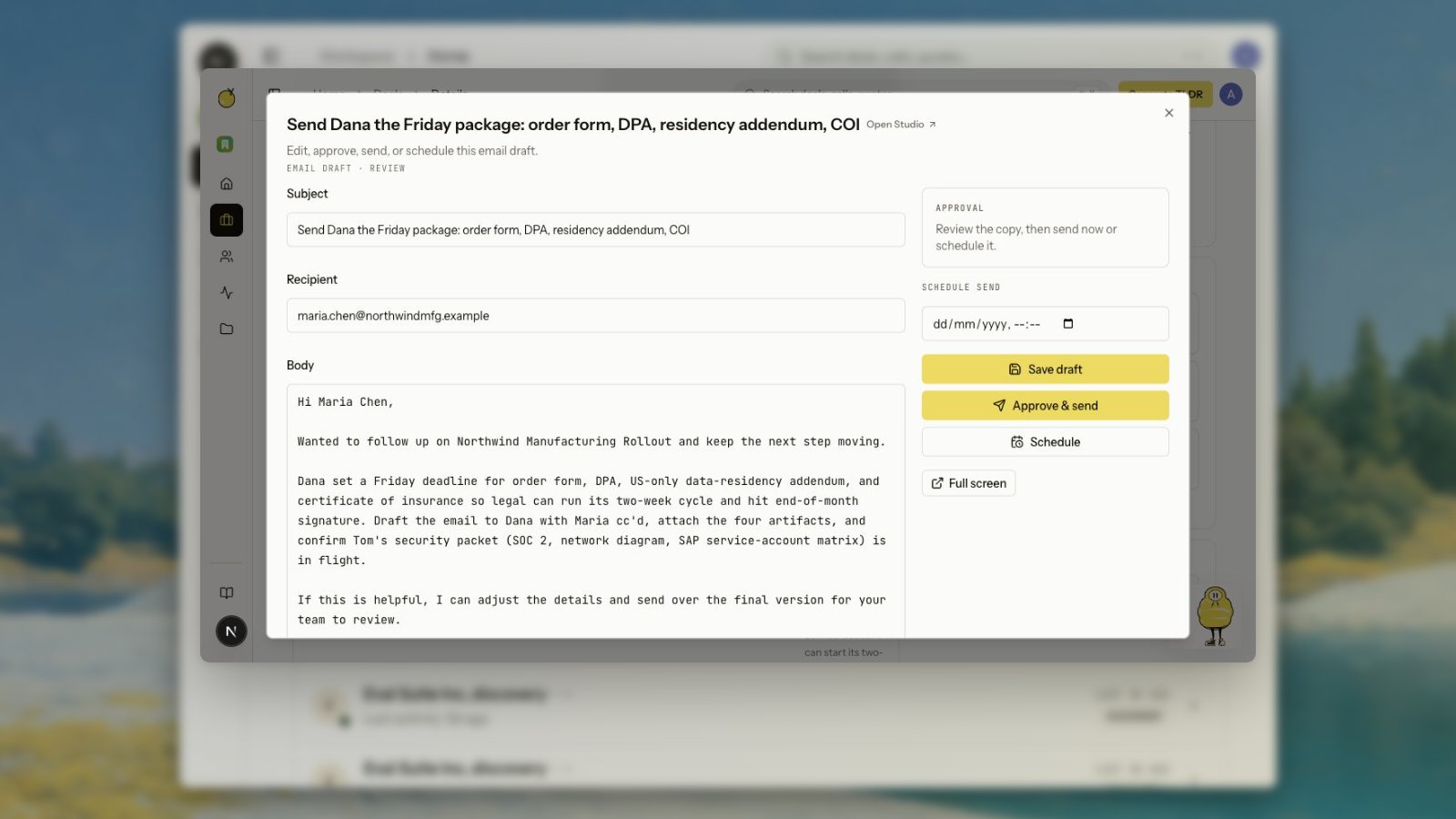
Review the draft, edit it, and send it from the app when Gmail is connected. Deal next-action cards can open drafts in context, so you can edit the recipient, subject, and body without leaving the deal.
Buyer-package email rows should open the existing reviewable draft when one exists. If the package has not produced a draft yet, the row creates one and then returns the seller to review. The expected workflow is edit, save, approve, send, or schedule from the deal, not ask Zu where the email went.
If email autopilot is off, agent-created sends wait for human approval before they leave the mailbox. If autopilot is on, the same draft and tracking path can send directly.
## Scheduling
You can schedule an email draft after review. Pick a future send time from the email editor, then click **Schedule**. Yuzu stores the schedule on the draft and sends it later through the connected Gmail account.
Scheduled emails stay editable until the scheduled time. If you change the copy, save the draft before scheduling again. Use **Clear schedule** when the email should stay as a draft.
Scheduled sends require the same Gmail connection and `gmail.send` scope as immediate sends.
The reply composer supports rich formatting:
* Bold and italic text
* Bulleted and numbered lists
* Links
* Inline pasted images
* File attachments within the composer limits
Sent replies are stored in Yuzu and threaded with the original Gmail conversation.
## Slack review and Gmail drafts
When Slack notifications are connected, Yuzu can send a video-ready package notification with the TLDR, business-case link, and proposed follow-up email. Sellers can open an email review modal from Slack, edit the message, and send it without opening the app first.
The same review flow can save a Gmail draft instead of sending immediately. That is useful when the seller wants the message in their mailbox, wants to make final edits in Gmail, or needs to route the draft through a team process before sending.
Slack actions still use the same ownership and approval checks as the in-app editor. A Slack button should not let one user send another user's draft.
## Why drafts are deal-aware
When a call belongs to a deal, drafts can reference earlier context without making the seller re-explain the whole relationship. If a call is unassigned, assign or merge it first for better context.
Business-case actions can also draft a short send email. That message is meant to share the TLDR and business-case page with the buyer, not to replace the buyer-facing page itself.
Deal and people pages show conversation threads so sent replies do not disappear after Gmail accepts them. The app should show both inbound and outbound rows in order, with enough From, To, and Date context to understand the thread.
## Tracking
Tracked sends can record opens, clicks, and replies. Those events feed deal activity and can influence signal, triggers, and Zu's next recommendation.
## What Yuzu creates
After a call is processed, Yuzu can draft follow-up copy using:
* The current transcript.
* Previous calls in the same deal.
* Captured next steps and objections.
* The generated TLDR video or Yuzu Link, when available.
* Existing email thread context when a reply is being drafted.
## How to use a draft
Review the draft, edit it, and send it from the app when Gmail is connected. Deal next-action cards can open drafts in context, so you can edit the recipient, subject, and body without leaving the deal.
Buyer-package email rows should open the existing reviewable draft when one exists. If the package has not produced a draft yet, the row creates one and then returns the seller to review. The expected workflow is edit, save, approve, send, or schedule from the deal, not ask Zu where the email went.
If email autopilot is off, agent-created sends wait for human approval before they leave the mailbox. If autopilot is on, the same draft and tracking path can send directly.
## Scheduling
You can schedule an email draft after review. Pick a future send time from the email editor, then click **Schedule**. Yuzu stores the schedule on the draft and sends it later through the connected Gmail account.
Scheduled emails stay editable until the scheduled time. If you change the copy, save the draft before scheduling again. Use **Clear schedule** when the email should stay as a draft.
Scheduled sends require the same Gmail connection and `gmail.send` scope as immediate sends.
The reply composer supports rich formatting:
* Bold and italic text
* Bulleted and numbered lists
* Links
* Inline pasted images
* File attachments within the composer limits
Sent replies are stored in Yuzu and threaded with the original Gmail conversation.
## Slack review and Gmail drafts
When Slack notifications are connected, Yuzu can send a video-ready package notification with the TLDR, business-case link, and proposed follow-up email. Sellers can open an email review modal from Slack, edit the message, and send it without opening the app first.
The same review flow can save a Gmail draft instead of sending immediately. That is useful when the seller wants the message in their mailbox, wants to make final edits in Gmail, or needs to route the draft through a team process before sending.
Slack actions still use the same ownership and approval checks as the in-app editor. A Slack button should not let one user send another user's draft.
## Why drafts are deal-aware
When a call belongs to a deal, drafts can reference earlier context without making the seller re-explain the whole relationship. If a call is unassigned, assign or merge it first for better context.
Business-case actions can also draft a short send email. That message is meant to share the TLDR and business-case page with the buyer, not to replace the buyer-facing page itself.
Deal and people pages show conversation threads so sent replies do not disappear after Gmail accepts them. The app should show both inbound and outbound rows in order, with enough From, To, and Date context to understand the thread.
## Tracking
Tracked sends can record opens, clicks, and replies. Those events feed deal activity and can influence signal, triggers, and Zu's next recommendation.