> ## Documentation Index
> Fetch the complete documentation index at: https://docs.yuzulabs.io/llms.txt
> Use this file to discover all available pages before exploring further.
# Deal pages
> Use a deal page to read the buyer thread, review Zu's next actions, and work from all known deal signal.
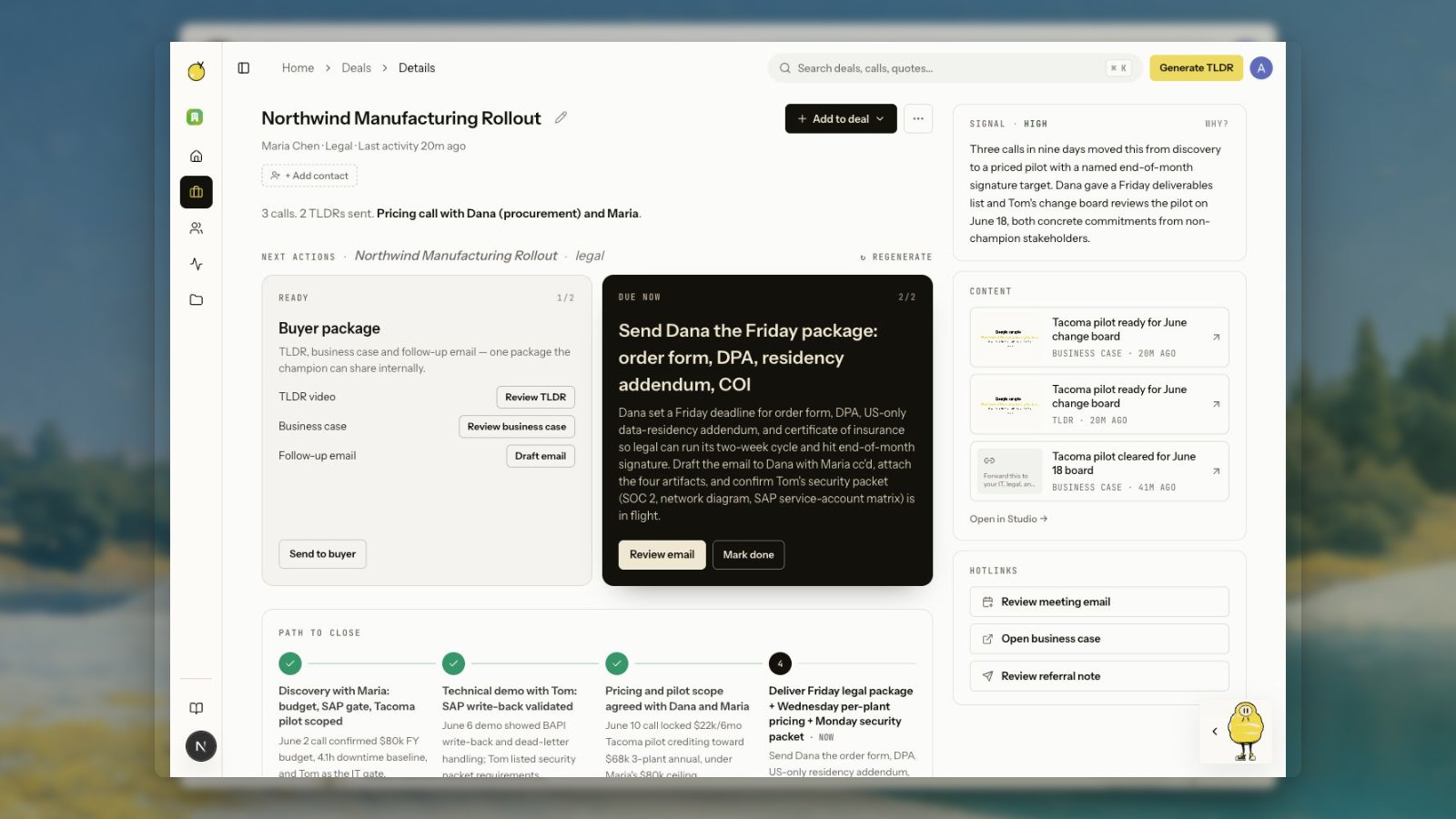
A deal page is the seller's operating view for a buyer thread. It brings together the history Yuzu has for one buyer context, even when the data came from different tools.
Deal pages are internal workspace pages. They are where your team reviews history, assigns calls, searches context, and copies the right public link when something should be shared.
 ## Deal thread
The thread is ordered by activity. It can include:
* Meeting transcripts
* Generated TLDR videos
* Public Yuzu Links
* Email threads and draft suggestions
* LinkedIn posts and engagement
* Captured quotes and indexed insights
* Searchable moments from previous calls
* Manual events, notes, links, extracted page text, and uploaded files
## Next actions
The next action cards are generated by the deal agent. They explain the recommended move, why it matters, and which surface to use.
The standard buyer package is shown as one grouped card, not separate TLDR, business-case, and email cards. The package can include:
* TLDR video
* Business-case page
* Follow-up email
* LinkedIn post, when one exists or is recommended
Each row shows the next available action: generate, generating, review, retry, after TLDR, or done. While generation is running, the row stays disabled and shows the in-progress state. When review is ready, the button opens the existing editor or public-page review surface.
The card next to the package is the contextual move, usually an email draft or a LinkedIn post when there is a reason to publish. Contextual cards stay separate so the standard buyer package does not swallow meeting-specific work.
Meeting next actions open a calendar invite dialog when Google Calendar is connected. Yuzu pre-fills known deal contacts and marks the action done after a real invite is created or an upcoming matching meeting is detected.
Some next actions also appear in [Tasks](/product/tasks), where you can scan work across deals without losing the deal link behind each item.
Previous actions stay visible below the cards so the current recommendation does not lose the trail of what already compounded.
Click **Regenerate** when new evidence arrived and the agent should re-evaluate the deal.
## Add evidence to a deal
Use **Add to deal** when useful evidence lives outside the connected sources.
* **Add activity** records a manual event or note.
* **Add link** attaches a web page and, when possible, extracts readable page text into the deal thread.
* **Upload file** stores a file as deal evidence.
* **Paste text/transcript** turns raw call notes or transcript text into deal context.
Link ingestion is deliberately conservative. Yuzu accepts normal HTTP and HTTPS links, blocks private or local network addresses, caps large pages, and falls back to metadata when full page extraction is not available. A successfully added link becomes deal evidence and can trigger the deal agent to re-read the thread.
## Summary and path to close
When Yuzu has enough activity, the page includes a concise summary under the header and a horizontal path-to-close timeline below the action cards.
The timeline shows what is done, what is happening now, and what still needs to happen before the deal closes. It is generated from deal evidence, so older deals may fill in after the deal agent runs again.
## Search inside a deal
Yuzu indexes both extracted insights and full-call chunks. That means a deal page can answer narrower questions like:
* "Who asked for the implementation timeline?"
* "Where did they mention security review?"
* "What objections came up before pricing?"
Search uses the deal grouping. After a merge, the destination deal gets the combined context.
## Public links, business-case pages, and standalone links
A **Yuzu Link** or business-case page is the public URL you can send to a buyer. A **deal page** is the internal workspace thread.
When a link belongs to a deal or buyer account, Library opens the deal page so you can see the surrounding context. Standalone links still open their link-management page because there is no buyer thread to resolve.
The business-case page is the primary buyer-facing deal page. The old timeline-style public deal room is no longer the expected share surface. For buyer-facing links, see [Business-case pages](/product/business-case-pages).
## Generated work and history
When new calls enrich a deal, Yuzu can generate newer versions of recaps and deal pages. Previous artifacts remain available in the thread so you can inspect or reuse older outputs.
Older videos, link entries, and generated drafts stay attached to the thread instead of becoming separate navigation destinations. This keeps the customer history in one place.
## Emails on a deal
Deal pages show email threads that Yuzu can tie to that deal: sends created for the deal and replies linked back to those sends.
When Zu creates an email draft for a next action, you can review it in deal context before sending. Edit the recipient, subject, and body, then send through the connected Gmail account. Use [People](/product/people) when you need the broader email history with a contact.
You can also schedule reviewed email drafts from the deal editor. The schedule stays attached to the draft until it sends or you clear it.
Drafts created for the buyer package should open as reviewable email work, not as a request to ask Zu again. If the package already has a draft, the row opens that draft so the seller can edit, send, or schedule it.
## LinkedIn on a deal
Deal pages can show LinkedIn draft assets when the agent has a reason to prepare a post. Open the asset to edit the copy, hashtags, and media, then approve, publish, or schedule it.
After publishing, LinkedIn engagement can return to the deal thread when Yuzu can match the actor to a saved person.
## Deal thread
The thread is ordered by activity. It can include:
* Meeting transcripts
* Generated TLDR videos
* Public Yuzu Links
* Email threads and draft suggestions
* LinkedIn posts and engagement
* Captured quotes and indexed insights
* Searchable moments from previous calls
* Manual events, notes, links, extracted page text, and uploaded files
## Next actions
The next action cards are generated by the deal agent. They explain the recommended move, why it matters, and which surface to use.
The standard buyer package is shown as one grouped card, not separate TLDR, business-case, and email cards. The package can include:
* TLDR video
* Business-case page
* Follow-up email
* LinkedIn post, when one exists or is recommended
Each row shows the next available action: generate, generating, review, retry, after TLDR, or done. While generation is running, the row stays disabled and shows the in-progress state. When review is ready, the button opens the existing editor or public-page review surface.
The card next to the package is the contextual move, usually an email draft or a LinkedIn post when there is a reason to publish. Contextual cards stay separate so the standard buyer package does not swallow meeting-specific work.
Meeting next actions open a calendar invite dialog when Google Calendar is connected. Yuzu pre-fills known deal contacts and marks the action done after a real invite is created or an upcoming matching meeting is detected.
Some next actions also appear in [Tasks](/product/tasks), where you can scan work across deals without losing the deal link behind each item.
Previous actions stay visible below the cards so the current recommendation does not lose the trail of what already compounded.
Click **Regenerate** when new evidence arrived and the agent should re-evaluate the deal.
## Add evidence to a deal
Use **Add to deal** when useful evidence lives outside the connected sources.
* **Add activity** records a manual event or note.
* **Add link** attaches a web page and, when possible, extracts readable page text into the deal thread.
* **Upload file** stores a file as deal evidence.
* **Paste text/transcript** turns raw call notes or transcript text into deal context.
Link ingestion is deliberately conservative. Yuzu accepts normal HTTP and HTTPS links, blocks private or local network addresses, caps large pages, and falls back to metadata when full page extraction is not available. A successfully added link becomes deal evidence and can trigger the deal agent to re-read the thread.
## Summary and path to close
When Yuzu has enough activity, the page includes a concise summary under the header and a horizontal path-to-close timeline below the action cards.
The timeline shows what is done, what is happening now, and what still needs to happen before the deal closes. It is generated from deal evidence, so older deals may fill in after the deal agent runs again.
## Search inside a deal
Yuzu indexes both extracted insights and full-call chunks. That means a deal page can answer narrower questions like:
* "Who asked for the implementation timeline?"
* "Where did they mention security review?"
* "What objections came up before pricing?"
Search uses the deal grouping. After a merge, the destination deal gets the combined context.
## Public links, business-case pages, and standalone links
A **Yuzu Link** or business-case page is the public URL you can send to a buyer. A **deal page** is the internal workspace thread.
When a link belongs to a deal or buyer account, Library opens the deal page so you can see the surrounding context. Standalone links still open their link-management page because there is no buyer thread to resolve.
The business-case page is the primary buyer-facing deal page. The old timeline-style public deal room is no longer the expected share surface. For buyer-facing links, see [Business-case pages](/product/business-case-pages).
## Generated work and history
When new calls enrich a deal, Yuzu can generate newer versions of recaps and deal pages. Previous artifacts remain available in the thread so you can inspect or reuse older outputs.
Older videos, link entries, and generated drafts stay attached to the thread instead of becoming separate navigation destinations. This keeps the customer history in one place.
## Emails on a deal
Deal pages show email threads that Yuzu can tie to that deal: sends created for the deal and replies linked back to those sends.
When Zu creates an email draft for a next action, you can review it in deal context before sending. Edit the recipient, subject, and body, then send through the connected Gmail account. Use [People](/product/people) when you need the broader email history with a contact.
You can also schedule reviewed email drafts from the deal editor. The schedule stays attached to the draft until it sends or you clear it.
Drafts created for the buyer package should open as reviewable email work, not as a request to ask Zu again. If the package already has a draft, the row opens that draft so the seller can edit, send, or schedule it.
## LinkedIn on a deal
Deal pages can show LinkedIn draft assets when the agent has a reason to prepare a post. Open the asset to edit the copy, hashtags, and media, then approve, publish, or schedule it.
After publishing, LinkedIn engagement can return to the deal thread when Yuzu can match the actor to a saved person.