> ## Documentation Index
> Fetch the complete documentation index at: https://docs.yuzulabs.io/llms.txt
> Use this file to discover all available pages before exploring further.
# Circleback
> Webhook automation integration for Circleback meeting transcripts.
Circleback sends completed meeting data to Yuzu through an automation webhook. There is no API key to paste into Yuzu; you create a Circleback automation, include the transcript payload, and save the signing secret in Yuzu.
**Auth method:** Webhook URL + optional HMAC signing secret.
## Prerequisites
* A Circleback account with access to **Automations**.
* A Yuzu workspace where the users who should own transcripts are members.
* Admin access to **Settings -> Notetaker** in Yuzu.
## Setup
In your Yuzu workspace, go to **Settings -> Notetaker**, click **Connect Notetaker**, and choose **Circleback**. Yuzu creates the integration and shows a unique webhook URL that looks like `https:///webhooks/notetaker/ntk_`.
In Circleback, open **Automations**, create a new automation, and use **After every meeting** as the trigger.
In **Choose what happens**, select **Send webhook request**.
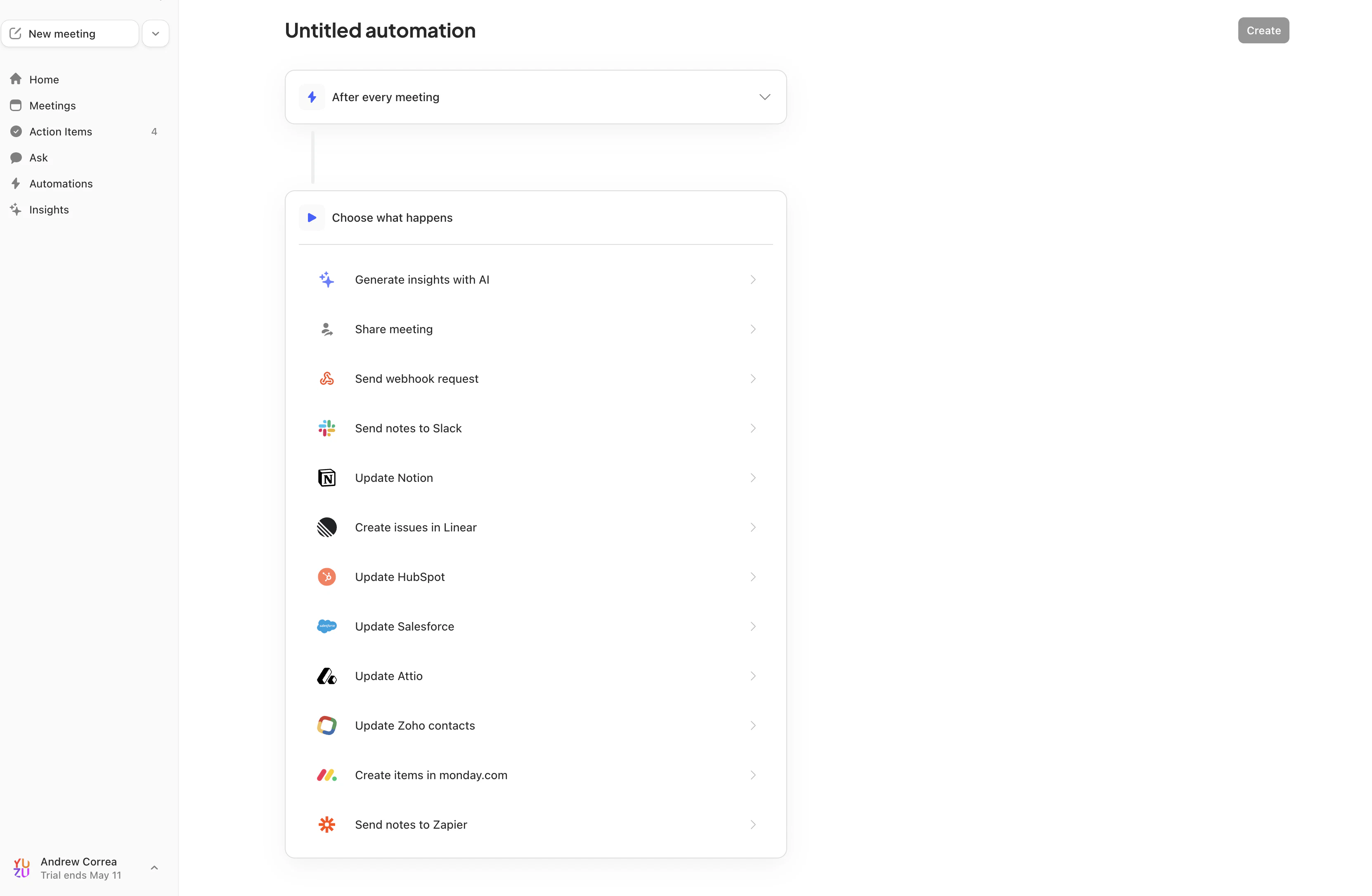 Copy the webhook URL from Yuzu and paste it into Circleback's **Endpoint** field.
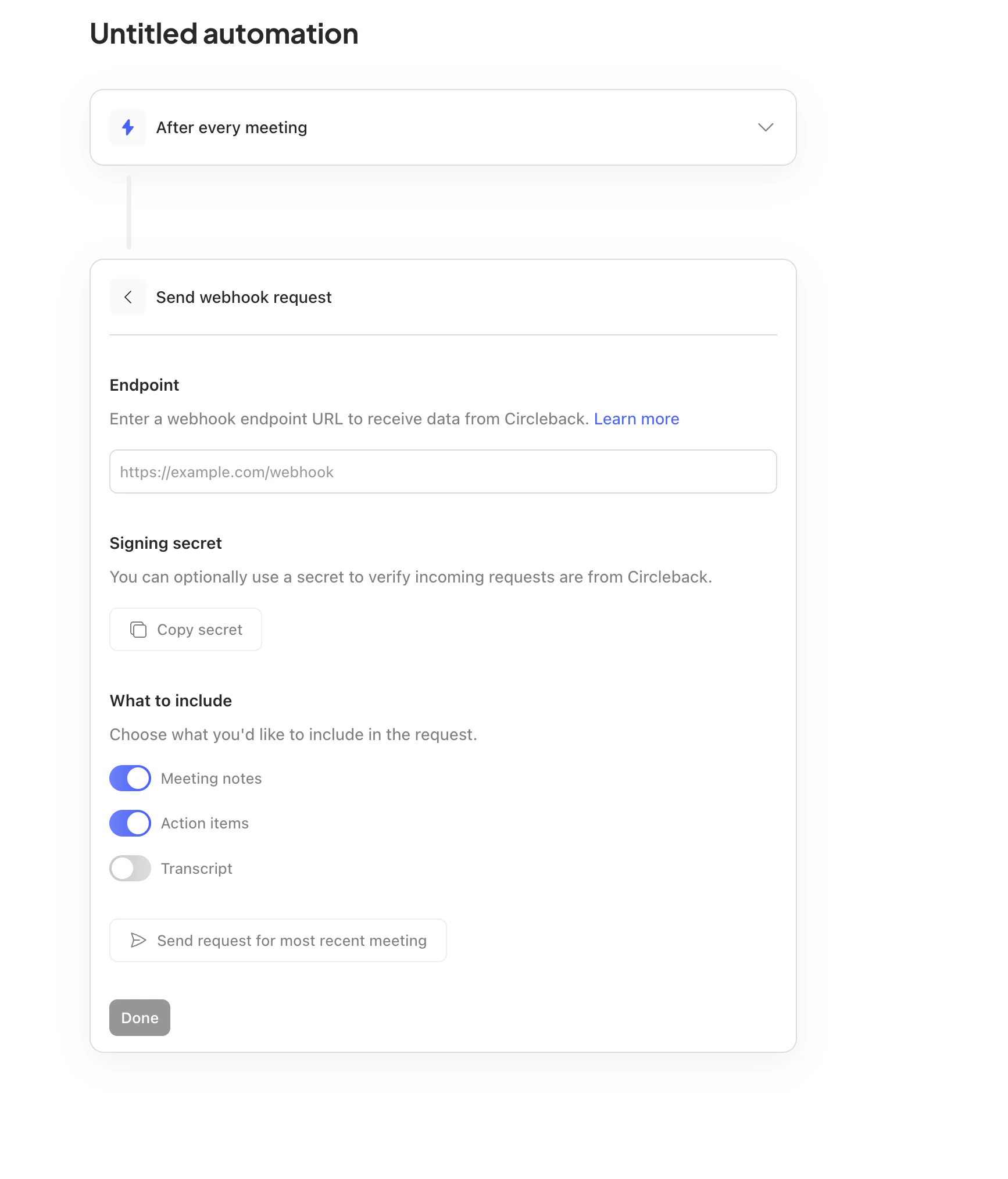 Circleback creates the signing secret for the webhook step. Click **Copy secret** in Circleback, then paste it into the **Signing Secret** field in Yuzu.
If Circleback is already connected in Yuzu, open the Circleback row on **Settings -> Notetaker** and paste the secret into the connected integration's **Signing Secret** field.
In Circleback's **What to include** section, enable **Meeting notes**, **Action items**, and **Transcript**. The transcript toggle is required for TLDR generation.
Circleback creates the signing secret for the webhook step. Click **Copy secret** in Circleback, then paste it into the **Signing Secret** field in Yuzu.
If Circleback is already connected in Yuzu, open the Circleback row on **Settings -> Notetaker** and paste the secret into the connected integration's **Signing Secret** field.
In Circleback's **What to include** section, enable **Meeting notes**, **Action items**, and **Transcript**. The transcript toggle is required for TLDR generation.
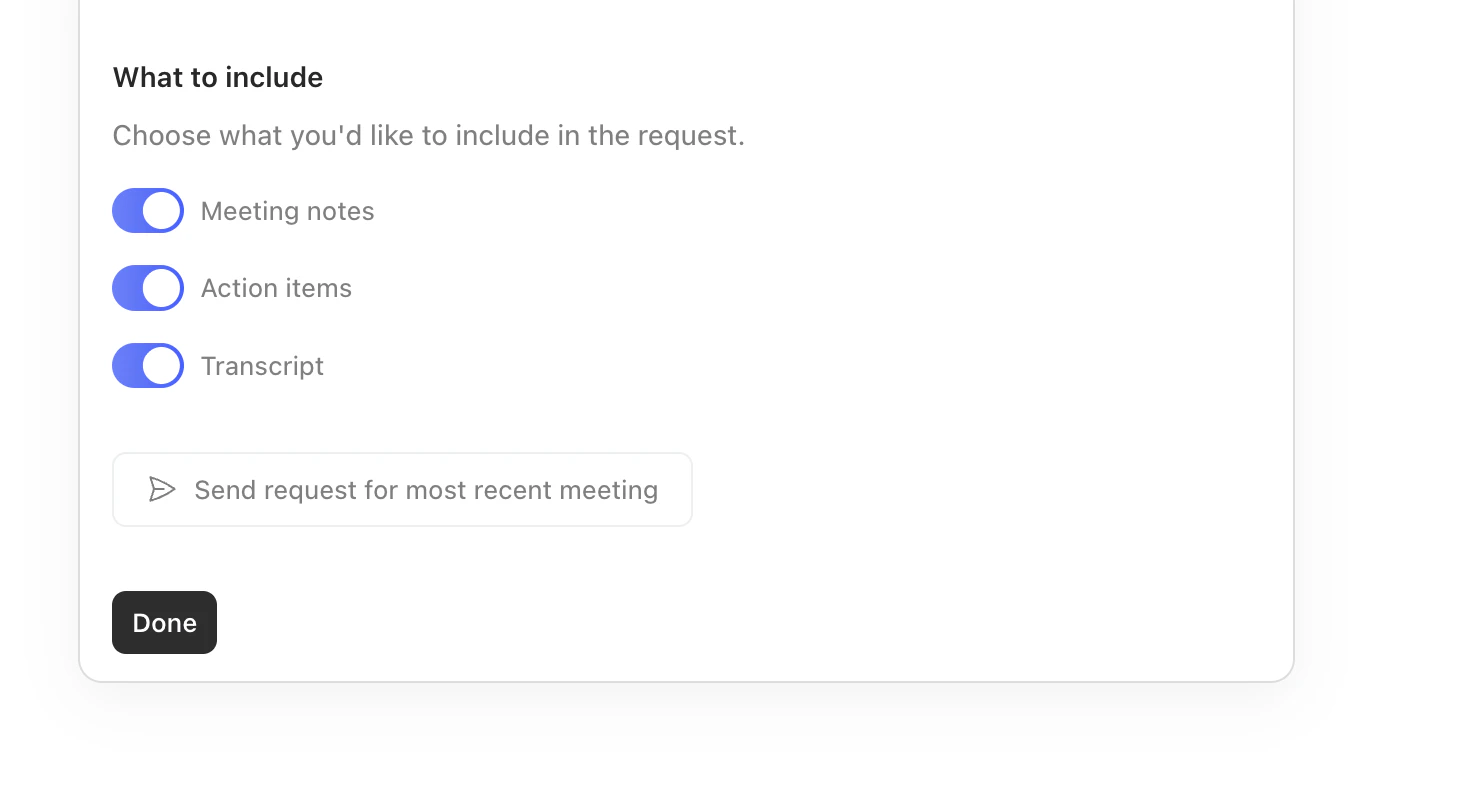 Click **Send request for most recent meeting** in Circleback. In Yuzu, confirm the webhook is received, then check **I have added the webhook URL to Circleback** and click **Complete Setup**. Return to Circleback and save the automation.
If you skip the signing secret, Yuzu can still receive Circleback webhooks but cannot verify they were sent by Circleback. Add the secret before using the integration in production, and do not share it outside your Yuzu and Circleback admin setup.
## Ownership mapping
Circleback includes attendee names and email addresses in each webhook. Yuzu maps attendee emails to members of the connected workspace and creates a transcript for each matched member. If none of the attendees match a Yuzu workspace member, the transcript is assigned to the user who connected Circleback.
## What gets imported
Circleback sends the full meeting payload in the webhook body, so Yuzu does not need a follow-up API call. Yuzu imports:
* Transcript segments with speaker labels and timestamps.
* Meeting title, duration, creation date, and attendees.
* Circleback notes as the transcript summary.
* Action items as Yuzu action item strings.
* The recording URL as the meeting video URL when Circleback sends `recordingUrl`.
* A source link back to `https://app.circleback.ai/meetings/{meetingId}`.
Circleback does not currently support historical sync in Yuzu. To backfill past meetings, use Circleback's bulk meeting actions to run the saved automation on selected meetings.
## Troubleshooting
Confirm the signing secret in Yuzu matches the secret shown in the Circleback webhook step. Circleback signs requests with the `x-signature` header using HMAC-SHA256 over the raw request body.
Make sure the meeting attendee email in Circleback exactly matches the Yuzu workspace member email. If no attendee email matches, Yuzu assigns the transcript to the integration owner.
Confirm transcripts are included in the Circleback webhook request. Yuzu discards Circleback webhook payloads with no transcript because there is no follow-up API fetch path for Circleback.
Click **Send request for most recent meeting** in Circleback. In Yuzu, confirm the webhook is received, then check **I have added the webhook URL to Circleback** and click **Complete Setup**. Return to Circleback and save the automation.
If you skip the signing secret, Yuzu can still receive Circleback webhooks but cannot verify they were sent by Circleback. Add the secret before using the integration in production, and do not share it outside your Yuzu and Circleback admin setup.
## Ownership mapping
Circleback includes attendee names and email addresses in each webhook. Yuzu maps attendee emails to members of the connected workspace and creates a transcript for each matched member. If none of the attendees match a Yuzu workspace member, the transcript is assigned to the user who connected Circleback.
## What gets imported
Circleback sends the full meeting payload in the webhook body, so Yuzu does not need a follow-up API call. Yuzu imports:
* Transcript segments with speaker labels and timestamps.
* Meeting title, duration, creation date, and attendees.
* Circleback notes as the transcript summary.
* Action items as Yuzu action item strings.
* The recording URL as the meeting video URL when Circleback sends `recordingUrl`.
* A source link back to `https://app.circleback.ai/meetings/{meetingId}`.
Circleback does not currently support historical sync in Yuzu. To backfill past meetings, use Circleback's bulk meeting actions to run the saved automation on selected meetings.
## Troubleshooting
Confirm the signing secret in Yuzu matches the secret shown in the Circleback webhook step. Circleback signs requests with the `x-signature` header using HMAC-SHA256 over the raw request body.
Make sure the meeting attendee email in Circleback exactly matches the Yuzu workspace member email. If no attendee email matches, Yuzu assigns the transcript to the integration owner.
Confirm transcripts are included in the Circleback webhook request. Yuzu discards Circleback webhook payloads with no transcript because there is no follow-up API fetch path for Circleback.